Home › Explore › The whole Bible in one picture
Cross-references
The whole Bible in one picture
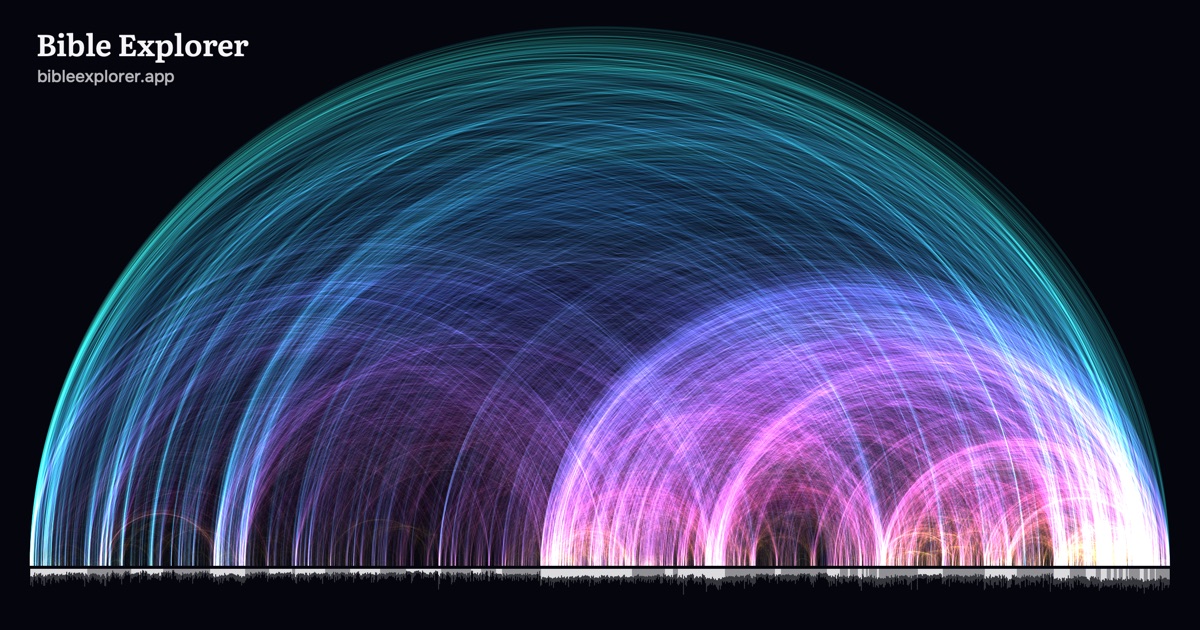
All 31,102 verses of the Bible on one line, Genesis to Revelation — and 101,224 cross-references between them as arcs. Point at a chapter, find the chain from any verse to any verse, or let it surprise you.
- 31,102verses on the line
- 101,224cross-references drawn as arcs
- 185,619cross-references in the data
- Arcs: links of at least 5 readers’ votes between two chapters. Data and bars: at least 3 votes.
nearfar
Things to find in the picture
What you see
Every verse has its place on the line, and the thin bar under it is as long as the number of its cross-references. The Bible is laid out from left to right in the usual order of its 66 books — 929 chapters of the Old Testament, then 260 of the New. Books alternate light and dark so you can tell them apart. On a narrow screen the same line is bent into a ring, Genesis at the top.
A cross-reference is a note that two passages belong together: a quotation, the same words, the same person or event. These are the ones readers marked as helpful — 97,307 links of at least 5 votes between 58,058 pairs of chapters. Short arcs (warm colors) stay close by; the long ones (cool colors) cross the whole Bible.
The picture shows where texts are joined, not what the joins mean.
The most connected chapters
By the number of links to other chapters.
- Psalm 119 — 1,325 links
- Romans 8 — 1,158 links
- 1 Peter 1 — 885 links
- John 14 — 854 links
- Matthew 5 — 849 links
- John 1 — 822 links
- James 1 — 779 links
- Luke 1 — 775 links
- Colossians 1 — 767 links
- Ephesians 4 — 759 links
- Ephesians 1 — 746 links
- 1 Peter 2 — 736 links
- Colossians 3 — 725 links
- Ephesians 5 — 718 links
- 1 John 2 — 712 links
- John 3 — 696 links
- John 6 — 696 links
- Hebrews 10 — 692 links
- Matthew 6 — 690 links
- Hebrews 12 — 682 links
How to use it
- Zoom with the wheel, two fingers or the + and − buttons, and drag to move: from the whole Bible down to single verses, whose numbers appear along the bottom.
- Choose a verse or a chapter: its arcs light up, everything else dims, and the panel lists every linked verse with its text — choose one to hop on, your path stays above it.
- The slider sets how many readers’ votes a cross-reference needs. The Filter tab keeps a Testament, a genre or a book; Layers shows the quotations of the Old Testament in the New, or the verses of one person, place or topic; Numbers counts what is shown.
- The Words tab lights up every verse with a word you type, or with a word of the Hebrew, Aramaic or Greek original (search “hesed”, “agape” or a Strong’s number), and ranks the most frequent and the most characteristic words of the Bible and of each book.
- «Who with whom» draws the people named in the same verses as a ring; «Books × books» shows how many cross-references join every two books.
- «Surprise me» shows a strong link between books far apart, a new one each time.
- «From verse to verse» finds the shortest chain of cross-references between any two verses and draws it step by step.
- Every view has its own address: «Share» sends it, «Save image» keeps the picture.
- On a keyboard: the arrow keys move from chapter to chapter (or verse to verse), with Shift — from book to book; / finds a word; Backspace goes one hop back; Escape clears.
Sources: OpenBible.info, CC BY 4.0 · Sources and rights